> For the complete documentation index, see [llms.txt](https://docs.itradingbot.net/llms.txt). Markdown versions of documentation pages are available by appending `.md` to page URLs; this page is available as [Markdown](https://docs.itradingbot.net/en/account/funds/assets-and-collateral.md).
# Assets and collateral
An asset review shows the assets of the selected Exchange Account on Bybit: the allocation between the wallets, the trading account indicators and the coins in the security. This section is for Exchange Account. When you choose your own Bybit or Binance API connection, it doesn't appear in the menu.
### Open the right account
If you haven't created an Exchange account yet, go through the preparation and creation of a sub-account. — [preparation and creation of sub-account](/en/account/exchange-accounts/exchange-account-creation-and-setup.md)
1. In the switch, select your Exchange Account from the dashboard header.
2. Open the Asset → Assets Review or go to the Assets page. — [The asset page](https://app.itradingbot.net/assets)
3. Check the name on the Subcaunt card. All the amounts on the page are for him.
### Two wallets inside the sub-account .
**The financial account** is used to replenish and store funds. To use these funds in trading, transfer them to a single trading account.
In the table of financial accounts, the amounts are shown in each coin:
* All she has left is her wallet.
* Available number available for transfer.
* The difference between the total and the available balance is frozen.
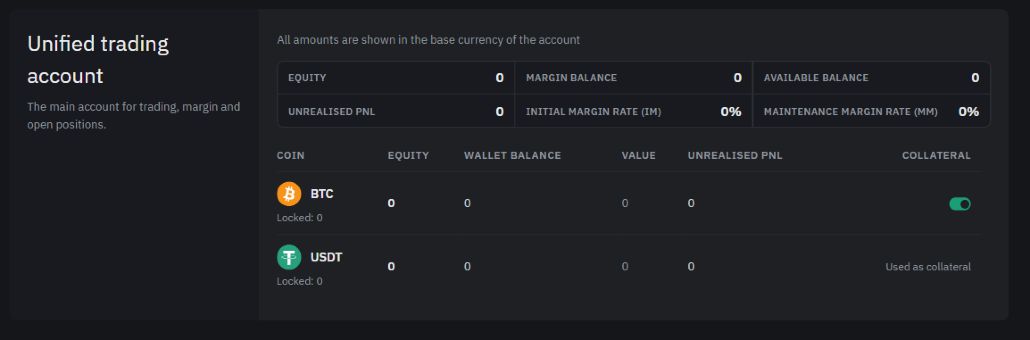
A single trading account is used for trading, margin and open positions. His chart shows the remaining coins, their valuation, unrealised PnL and the security status.
The total under-account is the value of both wallets in the specified currency. The distribution between them is shown next to it. If the score of one of the wallets is not obtained, the page reports incomplete data.
### Indicators of the trading account
Assets show the final valuation of the account, margin balance the amount of funds accounted for for security, and Available balance the balance calculated by the exchange with the margin requirements.
Unrealised PnL shows current profit or loss on open futures positions. **IM** and **MM** are for initial and supporting margins; they are shown in percentage in the dashboard.
Look at the units of measurement: the endpoints the monetary value of the account, and the balance of the coin in the table the amount of that coin. A prefix means that the value has not been obtained or is not available.
One trading account and security, and the data is demonstrative.
### What is the amount available for the transaction
To draw, open the draw form, select the coin and the net, and check the Available field. — [The form of the statement](https://app.itradingbot.net/withdraw) It refers to the selected currency in a single trading account. The total underlying account valuation and available margin balance do not replace this amount.
If the funds are in a financial account, you'll need a transfer between the wallets first. — [Translate between wallets](https://app.itradingbot.net/transfer) The final availability of the withdrawal also depends on the account checks, the network rules chosen and the commission shown in the form.
### Set up the security
The secured coins are involved in the pledge for derivative positions. Losses and liquidation could affect those assets. The unit account is described in the article [How to set up an Exchange Account](/en/company/how-exchange-account-mode-works.md).
1. In the Single Trading Account table, find the correct coin and column collateral.
2. If you need to change the way it's used in the security, switch the bumper and wait for the response. He's temporarily unavailable during the search.
3. Check the final status. Then update the trading account data to see the current figures.
For USDT and USDC, instead of the tumbler, the state is shown: the exchange does not allow switching their supply. Bybit determines the change potential for other coins. If the action is rejected, an error message will appear on the page.
### If the data is not loaded
Click the update button in the appropriate block: the review, financial and trading accounts are separate. If you report too many requests, wait for the permitted repeat.
A report of unavailability or a misspelling does not mean a zero balance. If the error persists, [Write in support.](https://t.me/ITradingBot_Support) Hide your account name, UID and other personal information in the screenshot.