> For the complete documentation index, see [llms.txt](https://docs.itradingbot.net/llms.txt). Markdown versions of documentation pages are available by appending `.md` to page URLs; this page is available as [Markdown](https://docs.itradingbot.net/en/account/funds/transfers-between-accounts-and-subaccounts.md).
# Transfers between accounts and subaccounts
The transfer moves the selected coin between your Bybit accounts in Exchange Account mode. You can transfer funds between a single trading account and a single financial account or between your two accounts.
### What you need
Select an active [Exchange Account](/en/account/exchange-accounts/exchange-account-creation-and-setup.md). transfers require an approved [Verification](/en/account/verification.md). If the result is still updated in the system, wait for completion.
The [Security](/en/account/account-security-and-sessions.md) section must have an application authenticator or access key connected. When sending the transfer, perform the checks that the security window will request.
Open the [Translate](https://app.itradingbot.net/transfer) page and check the selected sub-account: it will be debited. You need another active Exchange Account to transfer to your other sub-account.
### Between the wallets of one sub-account
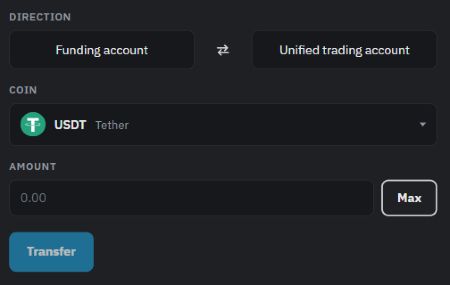
Use the Between Accounts block to move a coin between the financial and single trading accounts of your selected sub-account.
1. Check the address: Financial account → Single trading account or vice versa. If necessary, change the bills.
2. Pick a coin and indicate the amount in that coin. Focus on the Available value. The **Maximum** button sets the amount available for transfer.
3. Check the sub-account, the address, the coin and the amount. Click **Translate** and complete the proposed protection confirmation.
4. Wait for the results in the transfer history.
The amount available for transfer may be less than the balance sheet. For example, some of the funds may be used to secure positions. If the amount available is unknown, update the data before sending.
A transfer between the wallets of one sub-account. USDT As an example, the amount is not entered.
### Between your sub-accounts
In the Sub-Account Transfer block, funds are transferred from a single trading account of the selected sub-account to a single trading account of another of your sub-accounts.
1. Select the sub-account from which you want to transfer funds.
2. In the "Where" field, select another sub-account.
3. Pick a coin and enter the amount. Check Available for the selected destination.
4. Check the sender and the receiver, then click **Translate** and execute the proposed security confirmation.
If the amount you need is in the sender's financial account, first transfer it to their single trading account via the block Between your accounts. Wait for the transaction to be completed, then transfer to another sub-account.
### How to check the result
The History of transfers shows the coin, the sum, the sender, the recipient, and the status of both types of transfer.
* **In the processing** the order has been accepted, the final result has not yet been obtained.
* Done transfer completed. Check the balance of the recipient's account.
* transfer failed. The transfer ended in error. Study the message before another attempt.
### If the operation is delayed
Losing a connection or waiting on a page doesn't mean the transfer didn't happen. First, check the history; do not send the same amount again until the result of the previous transfer is established.
Another unfinished financial transaction on the participating account may temporarily block the new transfer. Wait for her results. If the status is not clear or a comparison is required, contact [support](https://t.me/ITradingBot_Support) and indicate the time of operation and message on the screen.