> For the complete documentation index, see [llms.txt](https://docs.itradingbot.net/llms.txt). Markdown versions of documentation pages are available by appending `.md` to page URLs; this page is available as [Markdown](https://docs.itradingbot.net/en/account/funds/withdrawals-and-addresses.md).
# Withdrawals and addresses
Exchange Account funds on Bybit are withdrawn on request for the address previously added. First, save the recipient's address, wait for the protection period to end, then enter the amount and confirm the transaction. For your own account connected via API, the withdrawal is processed on the exchange itself.
### Before the start
In the switch, select the Exchange Account you want and open the Asset → Exit or Exit page. — [The result page](https://app.itradingbot.net/withdraw) Check the name on the sub-account card: the funds will be debited from it.
You need an accessible sub-account, a successful identity verification and customized [Account protection](/en/account/account-security-and-sessions.md). — [verification of identity](/en/account/verification.md) Adding and removing addresses, as well as creating an order, requires confirmation in the protection window. Do whatever checks it asks.
The withdrawal is from the Single Trading Account. If the funds are in the **Financial account**, first make a transfer between the wallets. — [Translate between wallets](https://app.itradingbot.net/transfer)
### Add the recipient 's address
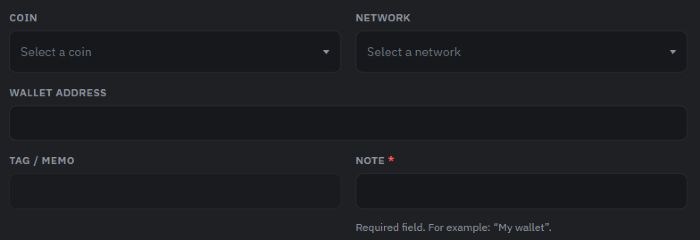
1. On the exit page, find the exit address block and click **Add the address**.
2. Pick a coin and a net. The network must match the network of the receiver's deposits.
3. Enter **The address of the wallet** and check it completely. If the recipient requires a Tag/Memo, specify it exactly according to the recipient's requirements.
4. Please fill in the Note to give the address you understand. This is a mandatory field, up to 64 characters.
5. Click Add address, go through confirmation and make sure the recording appears in the list.
Format checking helps to spot an error, but it doesn't confirm that the address belongs to the correct recipient. If the receiver and the selected network are not the same, correct them before adding.
Adding address: coin, network and receiver's receipt.
### When the address is available
After the address is successfully added, a 48-hour protection period is included. All user withdrawals, including those of previously saved addresses, are suspended. Adding the following address starts a new waiting period.
The deadline shown in the withdrawals block is temporarily closed and next to the address Available for the withdrawal c. Go ahead and time the panel. While the address is not yet available, it remains on the list, but it cannot be selected for the order.
Changes to account protection settings and the administrator's discarding of protection may also include a protection period. If you haven't added an address or changed a security, [Write in support.](https://t.me/ITradingBot_Support)
### Create an order
1. In the Withdrawal section, select the coin, the address you saved, and check the network.
2. Check the amount Available on a single trading account. It's the amount of the coin you choose, not the total value of all assets.
3. Enter the amount. The **Maximum** button sets the available number, taking into account the range of the selected network.
4. Compare the calculation: Sub-account is deleted, network commission and get to the address. At a minimum, the amount and commission limits depend on the coin and the network; the current values are shown in the form.
5. Click Create and then go through confirmation.
6. Find a new line in the order history section. The appearance of an order means that it has been created; it is not yet a completed withdrawal.
The time of processing the orders is indicated under the sending button. After dispatch, Bybit continues processing. The procedure for withdrawal and the applicable conditions are described in the article [How to set up an Exchange Account](/en/company/how-exchange-account-mode-works.md).
### Watch the results .
The results of the processing are not yet confirmed. The order may be pending review or may be processed by the exchange. Wait for the status change.
Done Bybit confirmed the withdrawal. **The transaction** column will show her ID if it's received. For supported networks, it opens the blockchain explorer. Check the listing on another exchange also on the receiver's side.
The result of this order will not be executed. The funds could have stayed in the account, already returned or still returned. Check the current balance; only this signature does not confirm the end of the return.
If the connection is lost or the result is not clear, update the history first. Do not create a new order for the same amount until the result of the previous one is determined. If the status remains unclear or the funds have not been available since the withdrawal, contact support.
### Manage the address list
In the withdrawal Address block, you can copy the saved address or delete the unnecessary confirmation record. An address with an unfinished order cannot be deleted.
The user list may contain up to **20 active addresses**; you can add no more than **5 addresses in the last 24 hours**. Removal does not cancel the current protection period. Re-adding a remote address starts the wait again.
### If the order is not available
* **No balance or network rules loaded.** Update the page and wait for the data. An unknown balance does not mean zero.
* Check the balance available, minimum, maximum, number of marks after the punch and commission. The amount must be more than the commission.
* The sub-account is already in operation, so wait until the previous withdrawal, transfer or conversion is complete and update the data.
* **The network or sub-account is unavailable.** The further action depends on the reason for the restriction.