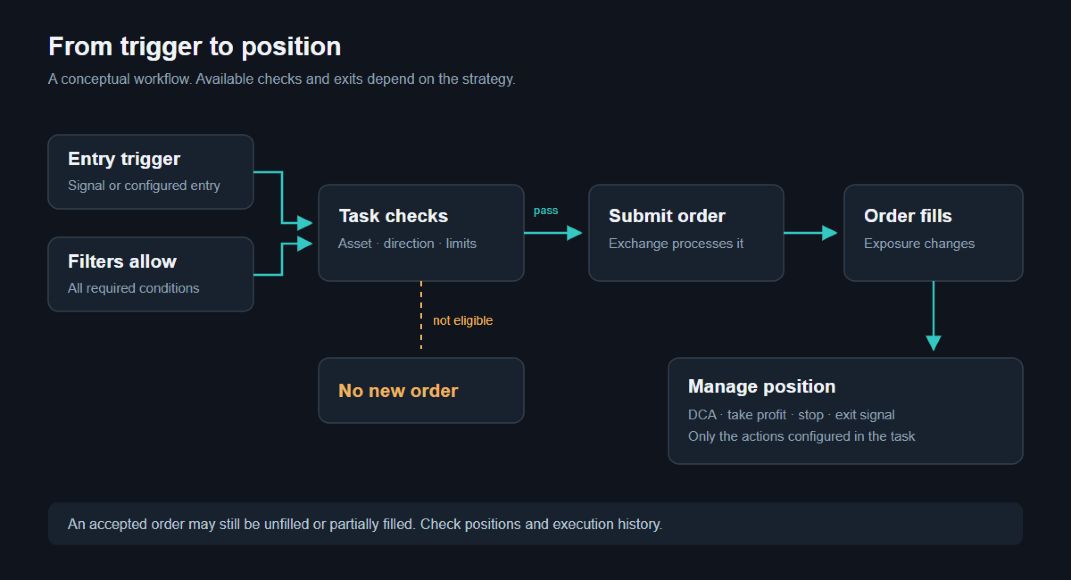
How the robot works
The trading robot performs the actions you set: it gets the entry conditions, sends the order and follows the trade. To understand its work, it's helpful to distinguish between the robot's settings, a particular task, and what's happening on the exchange.
Select the robot and the account
Typical trading robots Bybit and Binance have their own task and setup pages. Select a tool from the list of available pairs on your robot's page. For your own exchange account, use the Bybit or Binance connection instructions.
For Exchange Account on Bybit, robots are created together with the connection. Before you do, select the desired account in the dashboard header. Its tasks and settings relate to this account; the set of available features may differ from connecting to your own API.
The robot opens separately and has its own modes and parameters. The description of the usual tasks below does not replace the hedging instructions.
Robot, task and trade
The robot is linked to an exchange account. At its level, general settings, restrictions and notifications are set.
The Task describes the trade on the chosen instrument and direction: volume, order grid, entry and exit conditions, number of cycles.
The signal is a condition for action. In addition to this, the rest of the task and the launch limitations must be met.
Order order the exchange to buy or sell. The order must still be executed; the position on the exchange changes as it is executed.
In an active trade, the robot performs the trading actions of the task. Cycles set a repeat after the current passage is completed. The number of cycles alone does not indicate how many orders have already been executed.

What you need to start trading
Log in and check the status of the robot in the settings.
Create a task and check its tool, direction, volume, exit, and start-up.
To do the signal task, turn it on and wait for the right conditions. The signalless task is run with a separate button in its row.
Check the results on active trades, orders and positions. If the interface says the command is accepted, wait for the status update.
Running a robot doesn't mean it's going to open a trade right away. The entry depends on the task, the way it's run, the available funds and the restrictions of the exchange. Automation does not exclude the risk of loss.
Where to see the result
The task list shows the saved settings and task status. The task involved and the task with the open trade are different states.
The active trades show the robot's current work. You can check the volume, the price of the entry and the cycle.
The orders and positions allow you to check what's going on in the stock market. If the data is not updated or an error has occurred, read the status first before repeating the command.
Before changing or stopping
Shutting down the task, stopping the robot, discarding the cycles, cancelling the trade and closing it separate actions. Don't consider a position closed just because the robot or task is no longer active.
Before you do anything, check your account, active trades and open orders. After that, check the results on the updated data. The exact actions depend on the type of robot and the connection you choose.