> For the complete documentation index, see [llms.txt](https://docs.itradingbot.net/llms.txt). Markdown versions of documentation pages are available by appending `.md` to page URLs; this page is available as [Markdown](https://docs.itradingbot.net/en/hedge-robots/aggressive-hedge-emulation.md).

# Aggressive hedge emulation

<mark style="color:$tint;">**The Emulation**</mark> <mark style="color:$tint;"></mark><mark style="color:$tint;">tab allows you to observe the model of aggressive hedge on artificial candles. You enter the starting position, market conditions and hedge parameters; the forecast is executed in the browser and does not place the stock market orders.</mark>

### Set the initial conditions

1. <mark style="color:$tint;">Open the</mark> [<mark style="color:$tint;">Bybit</mark>](https://app.itradingbot.net/hedge-robot-bybit) <mark style="color:$tint;">or</mark> [<mark style="color:$tint;">Binance</mark>](https://app.itradingbot.net/hedge-robot-binance) <mark style="color:$tint;">hedge robot page and go to</mark> <mark style="color:$tint;"></mark><mark style="color:$tint;">**The Emulation**</mark> <mark style="color:$tint;"></mark><mark style="color:$tint;">tab.</mark>
2. <mark style="color:$tint;">Select the side of the starting position and indicate its USDT volume and entry price. The volume here is the nominal position, and the</mark> <mark style="color:$tint;"></mark><mark style="color:$tint;">**Deposit**</mark> <mark style="color:$tint;"></mark><mark style="color:$tint;">field sets a separate balance of the model.</mark>
3. <mark style="color:$tint;">Point your leverage and slide. These parameters are involved in the calculation, but they do not change the settings of your exchange account.</mark>
4. <mark style="color:$tint;">Choose the type of candles: up or down, saw, flute, or random movement. Set the volatility and horizon in the Max. bar field (1m).</mark>
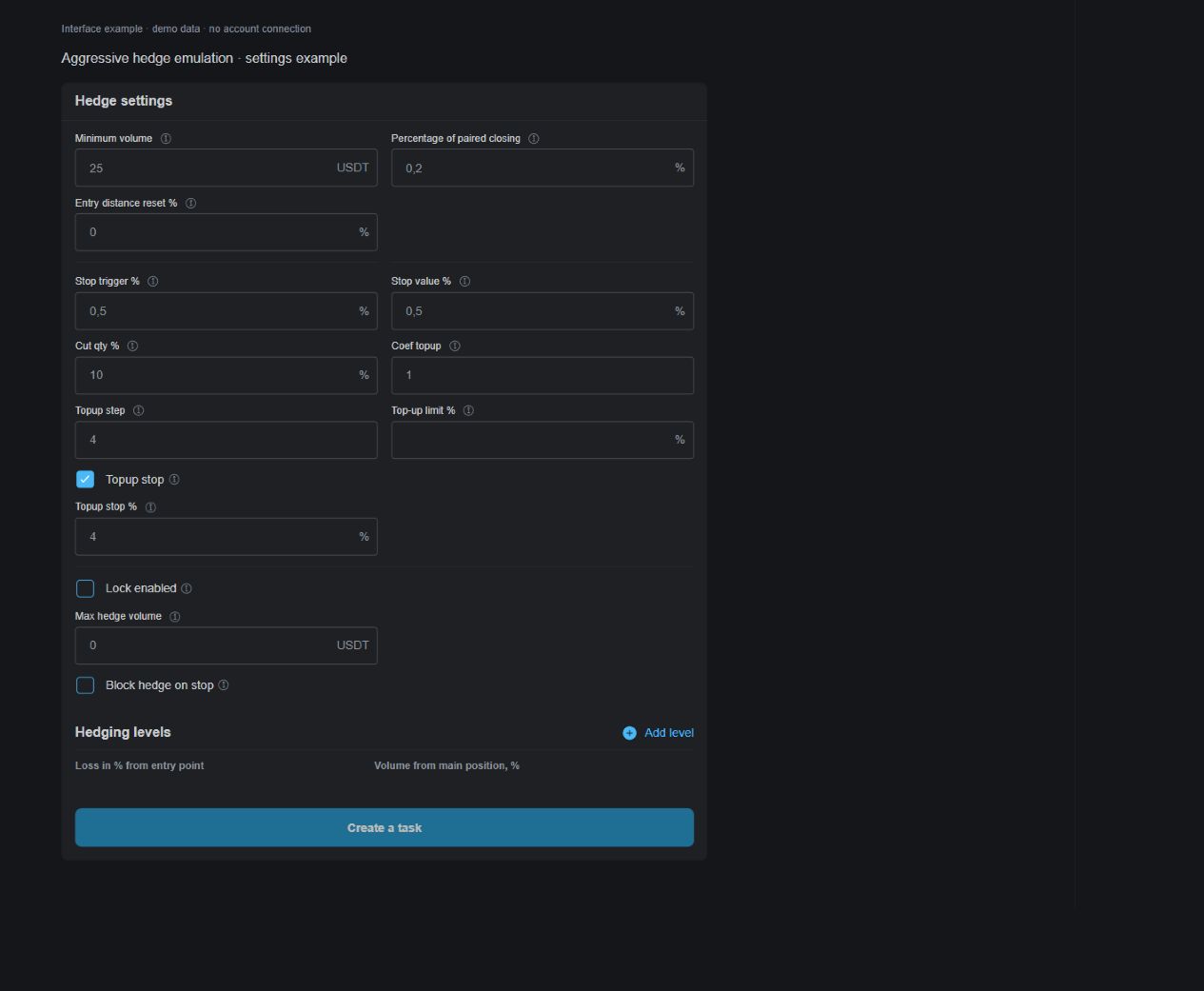
5. <mark style="color:$tint;">Fill in the hedge settings and the set levels. You can start with the prefix of the form, then check all the values you've set. The presset serves as an example of the setting.</mark>

<mark style="color:$tint;">For the re-comparison, save the value of the Sid field along with the generator parameters. Under the same starting conditions, it gives the same candle sequence. The cube button changes its meaning.</mark>

<figure><img src="https://1830394604-files.gitbook.io/~/files/v0/b/gitbook-x-prod.appspot.com/o/spaces%2F6lHX8ZJXkBHNJALLsrDj%2Fuploads%2F5vt5d68NojOJrRJVLyTL%2Fvisual-pass-20260914-aggressive-emulation-settings.jpg?alt=media" alt="A demonstration of the initial conditions of emulating an aggressive hedge."><figcaption><p>A demonstration of the initial conditions of emulating an aggressive hedge.</p></figcaption></figure>

### Run and clear the driveway

<mark style="color:$tint;">Press Start and run. The chart will show the candles, levels and action markings of the model; the statistics and the logs are updated. Unfilled mandatory fields are illuminated before launch.</mark>

* <mark style="color:$tint;">**Pause / Continue**</mark> <mark style="color:$tint;"></mark><mark style="color:$tint;">stop or resume motion on the script.</mark>
* <mark style="color:$tint;">Speed change the tempo of the display.</mark>
* <mark style="color:$tint;">**To the end**</mark><mark style="color:$tint;">, you must finish the rest of the synthetic progon.</mark>
* <mark style="color:$tint;">Screw up the current drive, schedule, statistics and log. The form parameters are for further verification.</mark>

<mark style="color:$tint;">The propulsion ends when the model is closed in pairs, the model is eliminated, or the horizon is reached. If positions remain open on the last bar, the result indicator reflects the estimate of their closure under current model conditions. It's not a closed-door.</mark>

<mark style="color:$tint;">To compare the hedge settings, repeat the drive with the same conditions as the generator and the sid. When the model is launched again, it takes on the actual shape values.</mark>

### Mass checking

<mark style="color:$tint;">The Monte Carlo mass inspection is for VIP tools and is available for purchase of a PRO for one year. This condition applies to a series of protons; the single emulation is described above. See the article</mark> [<mark style="color:$tint;">Free, PRO and VIP</mark>](/en/account/free-pro-and-vip-terms-and-payment.md)<mark style="color:$tint;">.</mark>

<mark style="color:$tint;">If you have a mass verification on your account, enter the number of times you can run and click Run. One set of parameters is checked on different random sequences of candles. Accessibility is shown at the button.</mark>

<mark style="color:$tint;">In the summary, distinguish between closed scenarios, model liquidations, and scenarios that are not completed within a given time. The results of the open scenarios remain evaluative. The percentage of closures in this sample is not likely to be the same in the real market.</mark>

<figure><img src="https://1830394604-files.gitbook.io/~/files/v0/b/gitbook-x-prod.appspot.com/o/spaces%2F6lHX8ZJXkBHNJALLsrDj%2Fuploads%2FdSE1ss7sN4iFBctGRYC1%2Fvisual-pass-20260914-aggressive-monte-carlo.jpg?alt=media" alt="A demonstration of the Monte Carlo mass-test panel, the model sample shown does not determine the likelihood of a real market outcome."><figcaption><p>A demonstration of the Monte Carlo mass-test panel, the model sample shown does not determine the likelihood of a real market outcome.</p></figcaption></figure>

### What the model takes into account

<mark style="color:$tint;">In the synthetic prototype, fixed model costs are used: a commission of 0.05% of the nominal performance of the hedge and funding of 0.01% once every eight model hours for the difference in the volumes of the parties. With positive funding, the long one pays the short one gets the overweight. Sliding is out of shape.</mark>

<mark style="color:$tint;">The initial main position is considered to be open: the commission for its initial entry in this choke is not calculated. Model fees and funding are not fees for your exchange account.</mark>

<mark style="color:$tint;">The price step and the volume supporting the margin and the liquidation are calculated by the model approximations. They don't load as individual terms of your asset and account. The generator also doesn't reproduce the order of orders, the stock market delays and the separate mark price and last price movements.</mark>

<mark style="color:$tint;">The emulation uses a common form of hedge parameters for both sides. The separate long and short settings of the working robot do not reproduce this shape. Use the barrel to study the model; its result does not guarantee the outcome of real trade.</mark>

### Move the settings to the task form

<mark style="color:$tint;">The Create Task button in the emulation tab opens the form of a new aggressive hedge task and fills in the supported settings. The values are copied to both sides; check the asset and the other terms of creation separately.</mark>

<mark style="color:$tint;">Check the level of the set and the grid of cuts in the form of the working robot carefully: the transfer only covers compatible model fields. This button does not send a trade assignment the final creation is confirmed in the constructor that has already opened.</mark>
