> For the complete documentation index, see [llms.txt](https://docs.itradingbot.net/llms.txt). Markdown versions of documentation pages are available by appending `.md` to page URLs; this page is available as [Markdown](https://docs.itradingbot.net/en/hedge-robots/classic-hedge-parameters.md).

# Classic hedge parameters

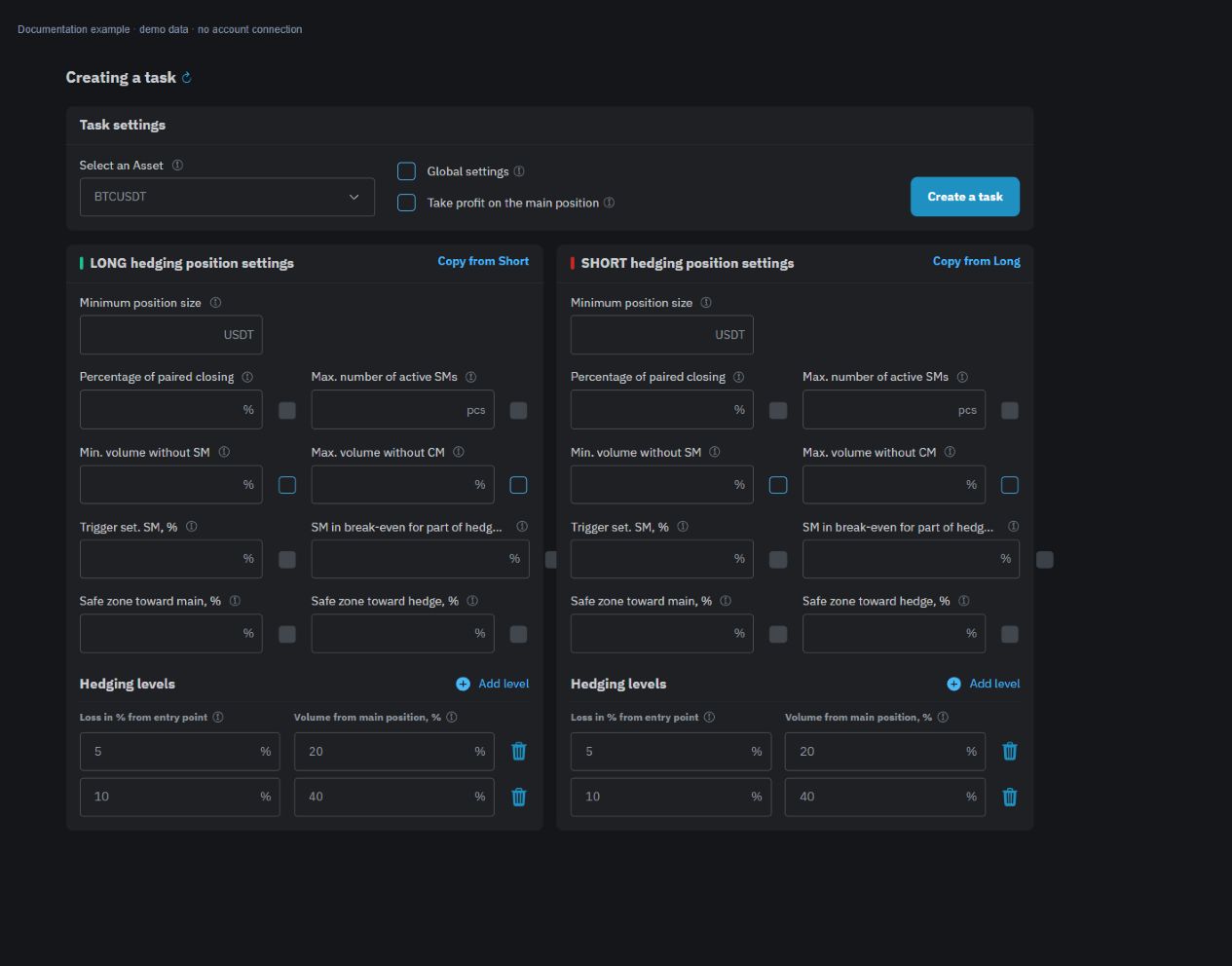
<mark style="color:$tint;">These fields are classical. They are set separately for the long base position and the short base position. The percentage of volume from the base position, the percentage of price change and the percentage of the result of the pair are calculated from different values.</mark>

### Minimum volume and levels

<mark style="color:$tint;">The</mark> <mark style="color:$tint;"></mark><mark style="color:$tint;">**Minimum position size**</mark> <mark style="color:$tint;"></mark><mark style="color:$tint;">sets the threshold for the value of the main position in the quotation currency. Before the hedge is broken down, the robot compares the amount of an asset multiplied by the current price of the marking to that threshold. If the value is equal to or less, the first hedge does not open.</mark>

<mark style="color:$tint;">In the</mark> <mark style="color:$tint;"></mark><mark style="color:$tint;">**Hedging levels**</mark> <mark style="color:$tint;"></mark><mark style="color:$tint;">block, enter levels one through eight. For each, indicate the price drop relative to the entry into the main position and the target volume of the counter position as a percentage of the number of assets in the main position.</mark>

<mark style="color:$tint;">The drop and volume of each next level should be significantly higher than the previous one. All the values are positive. When the robot reaches several thresholds, it takes the deepest level and shares the difference to its target, taking into account the existing hedge and the expected execution of the valleys.</mark>

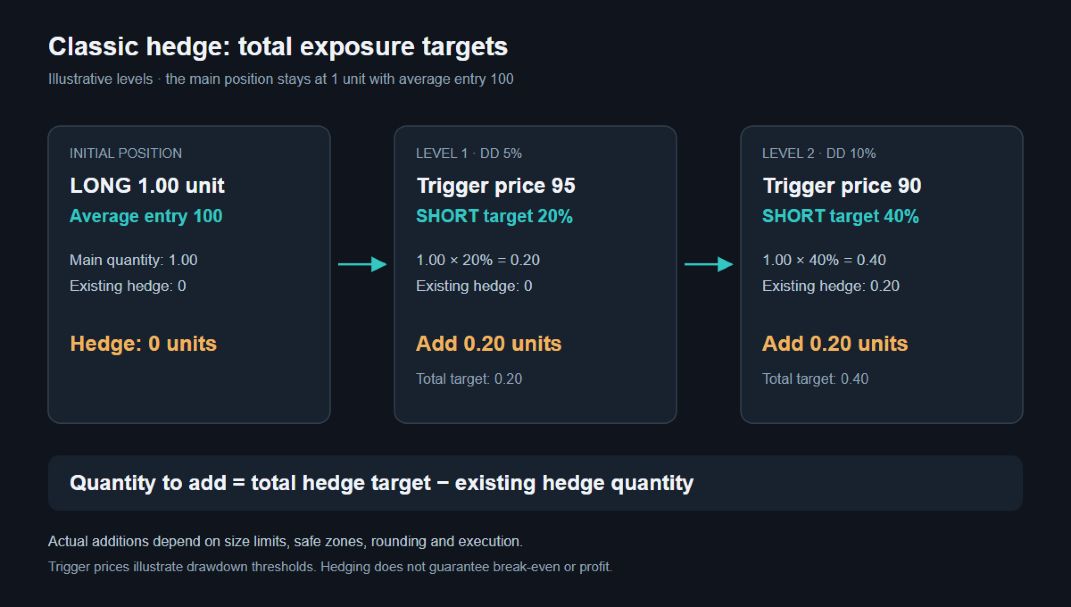
<mark style="color:$tint;">The levels are not folding. If in the learning example, the first goal is 20% of the main position, and the next 40%, the second goal means the total hedge of 40%, not 60%. It's an illustration of the calculation, not a set of settings for trading.</mark>

<figure><img src="https://1830394604-files.gitbook.io/~/files/v0/b/gitbook-x-prod.appspot.com/o/spaces%2F6lHX8ZJXkBHNJALLsrDj%2Fuploads%2FjpAcLrErNn95bSr5LYjA%2Fvisual-pass-20260914-hedge-classic-settings.jpg?alt=media" alt="A demonstration example of the shape of the parameters of the classic hedge in the English interface."><figcaption><p>A demonstration example of the shape of the parameters of the classic hedge in the English interface.</p></figcaption></figure>

<figure><img src="https://1830394604-files.gitbook.io/~/files/v0/b/gitbook-x-prod.appspot.com/o/spaces%2F6lHX8ZJXkBHNJALLsrDj%2Fuploads%2FOnJ74NdhvEHoqwHKVa0C%2Fdocs-edge-fix-20260914-classic-hedge-diagram.jpg?alt=media" alt="A demonstration example is a long to 1 unit with an average price of 100. The 5% threshold corresponds to the 95 price and the hedge goal of 0.20 units; when the 10% threshold is 0.40. If 0.20 remains open, another 0.20 is added to the next goal taking into account the limitations."><figcaption><p>A demonstration example is a long to 1 unit with an average price of 100. The 5% threshold corresponds to the 95 price and the hedge goal of 0.20 units; when the 10% threshold is 0.40. If 0.20 remains open, another 0.20 is added to the next goal taking into account the limitations.</p></figcaption></figure>

### Limiting the volume without stopping

<mark style="color:$tint;">**Min. volume without SM**</mark> <mark style="color:$tint;"></mark><mark style="color:$tint;">and Max. volume without SM set limits in percentages of the number of assets in the main position. Turn on and check both fields together: the limit in the algorithm applies when both boundaries are set.</mark>

<mark style="color:$tint;">The upper limit limits the additional volume for which no stop has yet been taken into account. The bottom one sets the minimum allowable next-line portion: if after the limitation there is less than that value, the robot misses the opening. The first level volume should not be less than the included lower boundary form checks this before saving.</mark>

<mark style="color:$tint;">These fields do not limit the total amount of positions in the account. The resulting yield also changes the rounding of the quantity according to the instrument rules and the result of the exchange's order acceptance.</mark>

### The stops for the parts of the hedge

<mark style="color:$tint;">**Set SM trigger, %**</mark> <mark style="color:$tint;"></mark><mark style="color:$tint;">— a favorable price change in price in favor of a particular part of the hedge relative to its entry price. When the threshold is reached, the robot tries to put a stop-market on that part.</mark>

<mark style="color:$tint;">SM in B/U for the hedge portion, % distance from the entry price of that portion to the profit-side hedge footing price. This field sets the price of the stop; the trigger above sets the condition for its exposure. The name B/U does not guarantee zero loss after commission, funding and actual execution.</mark>

<mark style="color:$tint;">The</mark> <mark style="color:$tint;"></mark><mark style="color:$tint;">**Maximum number of active SMs**</mark> <mark style="color:$tint;"></mark><mark style="color:$tint;">is 3 to 8. When the limit is filled, the robot can cancel one of the previously displayed stops to set a stop for the other part of the hedge. The limit refers to the simultaneous active footprint, not the number of parts of the position.</mark>

### Safe areas

<mark style="color:$tint;">The safe zone to the main, % and the safe zone to the hedge, % set boundaries around the price of the set stop: one in the direction of the main position, the other opposite.</mark>

<mark style="color:$tint;">As long as the price of the marking is within any existing safe-zone, including its boundaries, new levels of hedge do not open. The zone is removed when the price goes beyond its boundary in the direction of the main position. An exit to the opposite side does not remove the zone by itself.</mark>

### Steam closure

<mark style="color:$tint;">The percentage of the pair closure is compared to the result of the main and the opposite positions. The robot composes their current accounting result and the accumulated result of the closed parts of the hedge, then divides the sum by the total value of the entry of both open positions.</mark>

<mark style="color:$tint;">With an equal or greater percentage, the robot sends market orders to both parties to close. It's a percentage of the value of the position, not a deposit or margin used. A calculation of the threshold does not guarantee the same result after execution: check both positions and the history of the transactions.</mark>

### Management of the main position taek profit

<mark style="color:$tint;">Removing the taek-profit of the main position allows the robot to cancel its closing orders when the hedge is opened and remove new closing orders while the hedge is running. Don't expect any separate closing orders to remain intact.</mark>

<mark style="color:$tint;">When the amount of the hedge becomes zero, the robot tries to restore the profit at the retained prices to the current volume of the underlying position. The recovery depends on the exchange's response; the original distribution of the quantity between several orders should not be considered preserved.</mark>

<mark style="color:$tint;">Before you save, check both directions and the task area. Values in form and copy settings are not a recommendation; increasing the conversion volume adds requirements to the margin and does not guarantee an improvement in the result.</mark>