> For the complete documentation index, see [llms.txt](https://docs.itradingbot.net/llms.txt). Markdown versions of documentation pages are available by appending `.md` to page URLs; this page is available as [Markdown](https://docs.itradingbot.net/en/tools/calculations-and-verification/classic-hedge-in-the-backtester.md).

# Classic hedge in the Backtester

<mark style="color:$tint;">A classic hedge in a Backtester checks the opposite position along with the main strategy on historical data. The main position is opened by the strategy from the constructor, and the hedge is connected by a given fitting. Real orders don't come from that calculation.</mark>

<mark style="color:$tint;">This tool is part of the VIP package, available for a year's PRO purchase. The terms are</mark> [<mark style="color:$tint;">Free, PRO and VIP</mark>](/en/account/free-pro-and-vip-terms-and-payment.md)<mark style="color:$tint;">. For the aggressive mode, a separate</mark> [<mark style="color:$tint;">Emulation of the aggressive hedge</mark>](/en/hedge-robots/aggressive-hedge-emulation.md) <mark style="color:$tint;">is designed.</mark>

### 1. The first. Prepare the main strategy

<mark style="color:$tint;">Open the Baxter. —</mark> [<mark style="color:$tint;">Backtester</mark>](https://app.itradingbot.net/backtest-new) <mark style="color:$tint;">Select the exchange, asset and destination, fill out the dates, deposit, first order volume, leverage, commission and average settings. Enter the entry and exit conditions in the constructor. Details of the article are given in the Backtester article: first calculation. —</mark> [<mark style="color:$tint;">Backtester: first count.</mark>](/en/tools/calculations-and-verification/backtester-first-calculation.md)

<mark style="color:$tint;">For the first check, leave one pair. If you've used multi mode before, open it and click Clean: the pairs you select there have priority over the asset in the top box.</mark>

<mark style="color:$tint;">The rules for choosing multiple pairs are outlined in the article Multivariate: Checking Strategy on Multiple Assets. —</mark> [<mark style="color:$tint;">Multivariate: checking the strategy on several assets</mark>](/en/tools/calculations-and-verification/multi-test-testing-a-strategy-on-multiple-assets.md)

### Two. Open the tab Hedge robot

<mark style="color:$tint;">In the</mark> <mark style="color:$tint;"></mark><mark style="color:$tint;">**VIP tools**</mark> <mark style="color:$tint;"></mark><mark style="color:$tint;">block, before the designer, select Hedge Robot. The Robot Hedge Settings block opens (classic mode). Selecting this tab includes a hedge for calculation; switching to another VIP tab disables it.</mark>

<figure><img src="https://1830394604-files.gitbook.io/~/files/v0/b/gitbook-x-prod.appspot.com/o/spaces%2F6lHX8ZJXkBHNJALLsrDj%2Fuploads%2FR5VHBW8OnwACIc5qFpt2%2Fvisual-pass-20260914-backtest-classic-hedge.jpg?alt=media" alt="Active English tab of Hedge robot in BacktesterThe parameters of classical hedge and hedging levels."><figcaption><p>A demonstration of the classic hedge field in the English interface.</p></figcaption></figure>

<mark style="color:$tint;">When the hedge is turned on, the x200 speed switch (VIP) is removed and becomes inaccessible. For this test, a conventional engine is used.</mark>

### 3rd. Set the level of the opposite position

<mark style="color:$tint;">In the</mark> <mark style="color:$tint;"></mark><mark style="color:$tint;">**Hedging levels**</mark> <mark style="color:$tint;"></mark><mark style="color:$tint;">section , fill out two fields for each row:</mark>

* <mark style="color:$tint;">The percentage of the TVX how much the price should go against the main position relative to its average entry price.</mark>
* <mark style="color:$tint;">**Volume from the main position, %**</mark> <mark style="color:$tint;"></mark><mark style="color:$tint;">the total target volume of the counter position at this level relative to the current volume of the main position.</mark>

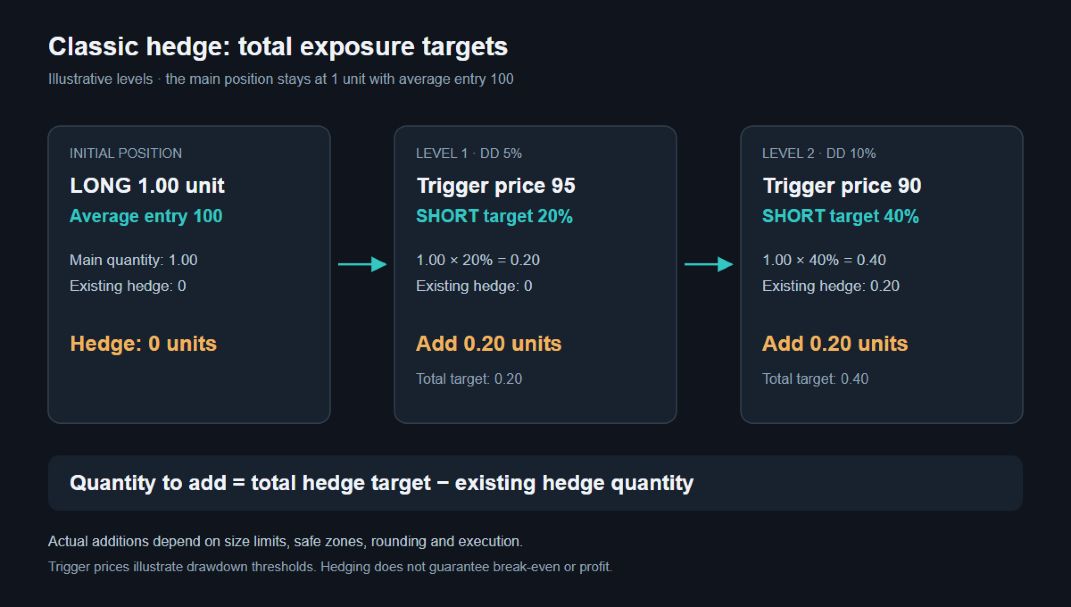
<mark style="color:$tint;">For example, levels of 20% and 40% in volume mean consistent goals for the overall hedge. If you've already got 20%, the next level brings the hedge to 40%, taking into account the model's limitations. It's an explanation of mechanics, not the finished parameters.</mark>

<mark style="color:$tint;">Click Add level to create a line; the basket removes the extra one. Fill the entrance and volume with positive numbers and check the sequence of goals. Empty lines and zero lines don't participate in the sent levels. If there's not a single correct line left, the calculation will go without the hedge parameters.</mark>

<figure><img src="https://1830394604-files.gitbook.io/~/files/v0/b/gitbook-x-prod.appspot.com/o/spaces%2F6lHX8ZJXkBHNJALLsrDj%2Fuploads%2FOnJ74NdhvEHoqwHKVa0C%2Fdocs-edge-fix-20260914-classic-hedge-diagram.jpg?alt=media" alt="A demonstration example is a long to 1 unit with an average price of 100. The 5% threshold corresponds to the 95 price and the hedge goal of 0.20 units; when the 10% threshold is 0.40. If 0.20 remains open, another 0.20 is added to the next goal taking into account the limitations."><figcaption><p>A demonstration example is a long to 1 unit with an average price of 100. The 5% threshold corresponds to the 95 price and the hedge goal of 0.20 units; when the 10% threshold is 0.40. If 0.20 remains open, another 0.20 is added to the next goal taking into account the limitations.</p></figcaption></figure>

### Four. Please specify the opening and closing conditions

<mark style="color:$tint;">The</mark> <mark style="color:$tint;"></mark><mark style="color:$tint;">**Minimum position size**</mark> <mark style="color:$tint;"></mark><mark style="color:$tint;">sets the threshold for the value of the underlying position to begin hedging. In the absence of the hedge components, the value of the underlying position at the current price shall be higher than this value.</mark>

<mark style="color:$tint;">The percentage of the pair closure sets the targeted calculation result of the main and counter positions taking into account the accumulated hedge result. The interest is calculated relative to the sum of both positions at their average entry prices, not relative to the deposit. It's a condition of the model, not a promised result after all the actual expenses.</mark>

<mark style="color:$tint;">Take the main position's profit tag is managed by the main position's profit tag during hedge work. Conform this to the terms of the basic strategy: it changes the behavior of the test combination.</mark>

### 5th. Set up the steps and safe zones

<mark style="color:$tint;">**Set SM trigger, %**</mark> <mark style="color:$tint;"></mark><mark style="color:$tint;">determines the favorable price movement for the hedge leg, after which the model sets its stop.</mark> <mark style="color:$tint;"></mark><mark style="color:$tint;">**SM at breakeven for the hedge leg, %**</mark> <mark style="color:$tint;"></mark><mark style="color:$tint;">sets the price of this stop relative to the entry price of the corresponding part.</mark>

<mark style="color:$tint;">The</mark> <mark style="color:$tint;"></mark><mark style="color:$tint;">**Maximum number of active SMs**</mark> <mark style="color:$tint;"></mark><mark style="color:$tint;">limits the number of simultaneously active stops. When the limit is reached, the model can shift the protection between the parts. Having an open part of the hedge doesn't mean it has an active stop all the time.</mark>

<mark style="color:$tint;">**Min. volume without SM**</mark> <mark style="color:$tint;"></mark><mark style="color:$tint;">and Max. volume without SM set limits on the addition of volume without footing in percentages from the main position. These constraints are applied together when both non-zero values are entered.</mark>

<mark style="color:$tint;">**Safe zone to main, %**</mark> <mark style="color:$tint;"></mark><mark style="color:$tint;">and</mark> <mark style="color:$tint;"></mark><mark style="color:$tint;">**Safe zone to hedge, %**</mark> <mark style="color:$tint;"></mark><mark style="color:$tint;">set the boundary of the zone from the stop price in two directions. Inside this zone, the model does not add a new level of hedge, even if the given entry is reached.</mark>

<mark style="color:$tint;">In the form of a Backtester, the parameters are set for the chosen direction of the main strategy. The rules for setting a living robot are described separately in the article Parameters of classical hedge; the permissible fields and limits of the two forms may differ. —</mark> [<mark style="color:$tint;">The parameters of the classical hedge</mark>](/en/hedge-robots/classic-hedge-parameters.md)

### 6. Make the calculation and check the result

<mark style="color:$tint;">Before you click Count, make sure that</mark> <mark style="color:$tint;"></mark><mark style="color:$tint;">**The hedge robot**</mark> <mark style="color:$tint;"></mark><mark style="color:$tint;">tab is selected, that there are positive levels filled, that the acceleration mode is turned off, and that the selected pairs and dates are correct.</mark>

<mark style="color:$tint;">The result is to open</mark> <mark style="color:$tint;"></mark><mark style="color:$tint;">**The strategy**</mark> <mark style="color:$tint;"></mark><mark style="color:$tint;">tab and check for saved hedge settings. Then look at the trades and the hedge, including the number of exposures, the profit and commission, if any. The absence of openings may mean that the main strategy has not opened a position or the conditions for drawdown, minimum volume, footing or safe-zone have not been met.</mark>

<mark style="color:$tint;">For comparison, repeat the same period with the same basic strategy without a hedge: move to another VIP tab. If you compare the usual engine in both versions, manually remove the restored accelerator. Compare the overall score, commission, drawdown and position at the end of the period.</mark>

<mark style="color:$tint;">The work with the saved launches is described in the article Backtest results and archive. —</mark> [<mark style="color:$tint;">Backtest and archive results</mark>](/en/tools/calculations-and-verification/backtester-results-and-archive.md) <mark style="color:$tint;">The historical calculation assumptions in the Baxter article: parameters and limitations of the model. —</mark> [<mark style="color:$tint;">Backtester: parameters and limitations of the model</mark>](/en/tools/calculations-and-verification/backtester-model-parameters-and-limitations.md) <mark style="color:$tint;">The calculation does not fully reproduce the execution on the exchange and does not guarantee profit.</mark>