> For the complete documentation index, see [llms.txt](https://docs.itradingbot.net/llms.txt). Markdown versions of documentation pages are available by appending `.md` to page URLs; this page is available as [Markdown](https://docs.itradingbot.net/en/trading-terminal/using-the-platform-on-a-phone.md).

# Using the platform on a phone

<mark style="color:$tint;">Open the ITradingBot in the phone's browser. The account panel and the Binance and Bybit futures terminals have a mobile navigation and small screen form representation.</mark>

### Log in to your account

<mark style="color:$tint;">Open the ITradingBot dashboard and log in to the same account you use on your computer. —</mark> [<mark style="color:$tint;">The ITradingBot panel</mark>](https://app.itradingbot.net/account) <mark style="color:$tint;">If a security confirmation request is received, pass it.</mark>

<mark style="color:$tint;">For a new account, the Telegram link is mandatory; the user name of the @nik type must be entered in Telegram. The steps to register, bind and restore the password are described in the login instructions. —</mark> [<mark style="color:$tint;">instructions for entering</mark>](/en/account/registration-sign-in-and-account-recovery.md)

### Open the mobile terminal

<mark style="color:$tint;">Go to the terminal of the desired exchange through the dashboard menu. Usually, the mobile representation is automatically selected. If you have a table layout, please use the following link:</mark>

* **Binance Futures mobile** — [**Binance Futures mobile version**](https://app.itradingbot.net/terminal-binance?view=mobile)
* **Bybit Futures mobile** — [♪ Bybit Futures ♪ Mobile version ♪](https://app.itradingbot.net/terminal-bybit?view=mobile)

<mark style="color:$tint;">In the top panel, check the exchange, the market and the account you selected. Clicking on the account block opens the menu; switch the account before you work with its data and orders.</mark>

<mark style="color:$tint;">The bottom navigation is</mark> <mark style="color:$tint;"></mark><mark style="color:$tint;">**Graph**</mark><mark style="color:$tint;">ic,</mark> <mark style="color:$tint;"></mark><mark style="color:$tint;">**Market**</mark><mark style="color:$tint;">,</mark> <mark style="color:$tint;"></mark><mark style="color:$tint;">**Positions**</mark><mark style="color:$tint;">,</mark> <mark style="color:$tint;"></mark><mark style="color:$tint;">**Monitoring**</mark> <mark style="color:$tint;"></mark><mark style="color:$tint;">and Menus. Choosing a pair in the Market brings it back to its schedule. Additional panels are opened from the graphics screen.</mark>

<figure><img src="https://1830394604-files.gitbook.io/~/files/v0/b/gitbook-x-prod.appspot.com/o/spaces%2F6lHX8ZJXkBHNJALLsrDj%2Fuploads%2FbUaq0oEW7z5eAvnStJcE%2Fvisual-pass-20260914-mobile-menu.jpg?alt=media" alt="A demonstration example of a mobile terminal menu in an English interface."><figcaption><p>A demonstration example of a mobile terminal menu in an English interface.</p></figcaption></figure>

### Consider the features of the mobile screen

<mark style="color:$tint;">The layout of the elements is different from the desktop terminal. The set of actions available depends on the page, the market and the connection: the instructions for the desktop widget cannot be automatically applied to any mobile screen.</mark>

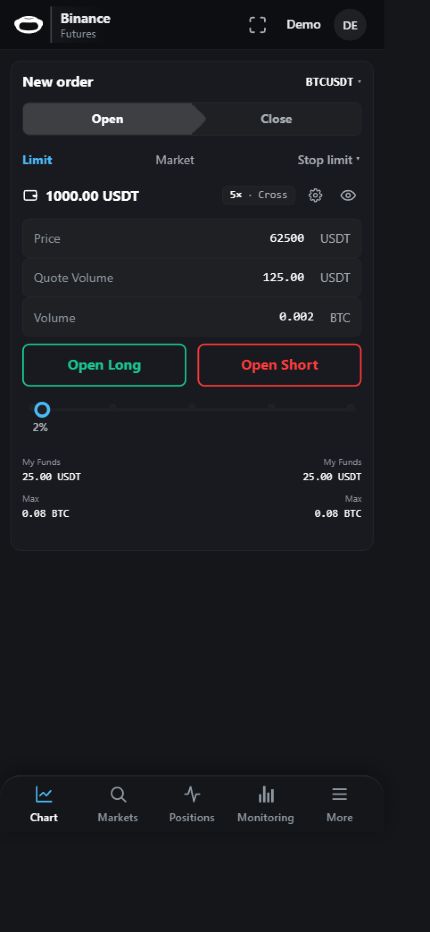
<mark style="color:$tint;">The mobile forms work with your trading account. Before you send an action, check the selected pair, the direction, volume and terms of the order in the form itself.</mark>

<mark style="color:$tint;">When you return from another application or restore your internet, wait for the data to be updated. If the numbers or status are not updated, check the connection and restart the page. Before you re-send the trading team, check the tasks, orders and positions.</mark>

<figure><img src="https://1830394604-files.gitbook.io/~/files/v0/b/gitbook-x-prod.appspot.com/o/spaces%2F6lHX8ZJXkBHNJALLsrDj%2Fuploads%2FW3d3R2lCbSlrtr26i1st%2Fvisual-pass-20260914-mobile-order.jpg?alt=media" alt="Demonstration example of mobile form of order: 125 USDT corresponds to 0,002 BTC at 62 500 and 25 USDT I&#x27;m not going to be able to use my own money on a 5x leverage."><figcaption><p>Demonstration example of mobile form of order: 125 USDT corresponds to 0,002 BTC at 62 500 and 25 USDT I'm not going to be able to use my own money on a 5x leverage.</p></figcaption></figure>